Hiển thị các bài đăng có nhãn SQL Server. Hiển thị tất cả bài đăng

Chủ Nhật, 6 tháng 8, 2017

What is SET NOCOUNT ON?

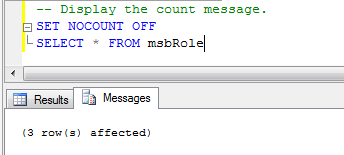
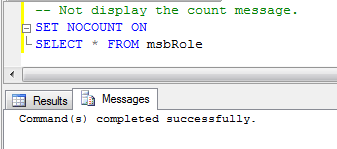
  • When SET NOCOUNT is ON, the count (indicating the number of rows affected by a Transact-SQL statement) is not returned. When SET NOCOUNT is OFF, the count is returned. It is used with any SELECT, INSERT, UPDATE, DELETE statement.
  • The setting of SET NOCOUNT is set at execute or run time and not at parse time.
  • SET NOCOUNT ON improves stored procedure (SP) performance.
  • Syntax: SET NOCOUNT { ON | OFF }
Example of SET NOCOUNT ON:
enter image description here
Example of SET NOCOUNT OFF:
enter image description here
Read More »

Thứ Sáu, 23 tháng 10, 2015

Cách restore file database backup thành một database mới

Bạn đã có một database vngreen được restore từ một file bkup_vngreen_0208_alter.bak . Và giờ bạn muốn restore file backup này thành một database khác minhanh. Đây là cách thực hiện:
- Đầu tiên hãy xem tên file vật lý mdf và ldf của file backup. Trong sql server sử dụng lệnh :

EXEC sp_helpdb 'vngreen'


Bạn có thể thấy VNGreen và VNGreen_log chính là tên file của file mdf và ldf.

- Tiếp theo là restore database mới. Sử dụng lệnh:

USE [master]
RESTORE DATABASE [minhanh] FROM  DISK = N'E:\laptrinh\mvc\vngreen\bkup_vngreen_0208_alter.bak' 
WITH  FILE = 1,
MOVE N'VNGreen' TO N'C:\Program Files\Microsoft SQL Server\MSSQL11.MSSQLSERVER\MSSQL\DATA\minhanh.mdf',
MOVE N'VNGreen_log' TO N'C:\Program Files\Microsoft SQL Server\MSSQL11.MSSQLSERVER\MSSQL\DATA\minhanh_log.ldf',  
NOUNLOAD,  STATS = 5

GO

Vậy là bạn đã restore xong! Chúc vui!
Read More »

Thứ Tư, 7 tháng 10, 2015

Solution when Like sql does not work

Example, you have query using Like operation, everything seem to be good, but you can not receive any row even you have a row in table tbl_Article which have Title column = 'Thật hài hước quá' .

DECLARE @Keyword NVARCHAR(2000) = N'hài hước'

SELECT  *
FROM dbo.tbl_Article a
WHERE a.Title LIKE N'%' + @Keyword + '%'

This's happen because there is a newline at the end of the label, so 

this is solution:

SELECT  *
FROM dbo.tbl_Article a
WHERE REPLACE(REPLACE(a.Title, CHAR(10), ''), CHAR(13), '') LIKE N'%' + @Keyword + '%'

Or you can update Title column:

UPDATE [page] Set [label] = REPLACE(REPLACE([Title], CHAR(10), ''), CHAR(13), '')


Read More »

Thứ Năm, 20 tháng 8, 2015

SQL join

This image show to sql join work:

Read More »

Thứ Ba, 30 tháng 6, 2015

Some notice to run sql server query, store procedure faster

Here is some notice, we can use to run query sql faster:
  • 1. Operate on small result sets – Don’t use “SELECT *”, instead limit the number of columns by including only those columns that are required. Also, try to use a highly restrictive condition in the WHERE clause to only include the required data. In short, retrieve only the rows and columns that are needed.
  • 2. Avoid cursors – Avoid using cursors if you can, and try to use a Temp table with identity column to implement looping mechanism. I always create a temp table with an identity column and use a while loop to iterate over data sets.
  • 3. Fully qualify Database objects – Always fully qualify database objects with the owner. This will reduce the overhead of name resolution and might also avoid execution plan recompiles.
  • 4. Avoid implicit datatype conversions in the query – Implicit conversions can prevent the indexes from being used by the optimizer and will also add overhead by costing extra CPU cycles for datatype conversions.
  • 5. Don’t prefix stored procedure name with sp – Many Developers are used to prefixing stored procedure names with sp_. If a stored procedure having an sp_ prefix is executed, SQL Server always looks in the master database first to find the stored procedure. Also, let’s say you have a stored procedure named sp_Test, if Microsoft decides to use this name, all the references to this stored procedure will break, so never begin the name of a SP with sp_.
  • 6. Use SET NOCOUNT – SQL Server sends messages(count of the number of rows affected) to the client after each T-SQL statement is executed. If you are using stored procedure, there is no need pass this information and using this option will turn off the messages that are sent back to the client. Though this is not a huge thing, it is definitely something to consider.
Read More »